

Ask any NDIS support worker what they’d cut from their week, and progress notes will be near the top of the list. Not because notes aren’t important — they’re the essential audit trail that keeps a provider registered — but because the way most providers capture them still revolves around a clipboard, not a modern workforce.
If you run an NDIS support service in Australia, you know the drill. A worker finishes a shift, opens the laptop or participant app, finds the right participant, locates the correct plan goal, searches for the right phrasing, and types up what just happened. By the time they log off, they’ve often spent the better part of an hour on paperwork instead of care.
There’s a better way to measure that hour — and it’s a number every provider should put on the wall this quarter.
The hidden tax: 45 minutes a day, per worker
According to sector data from Yes AI (2025), support workers without AI assistance spend an average of 45 minutes per day on progress notes. With AI documentation tools — voice-to-note, NDIS-aware templating, and auto-populated participant context — that drops to roughly 20 minutes per day. A 55% reduction in documentation time.
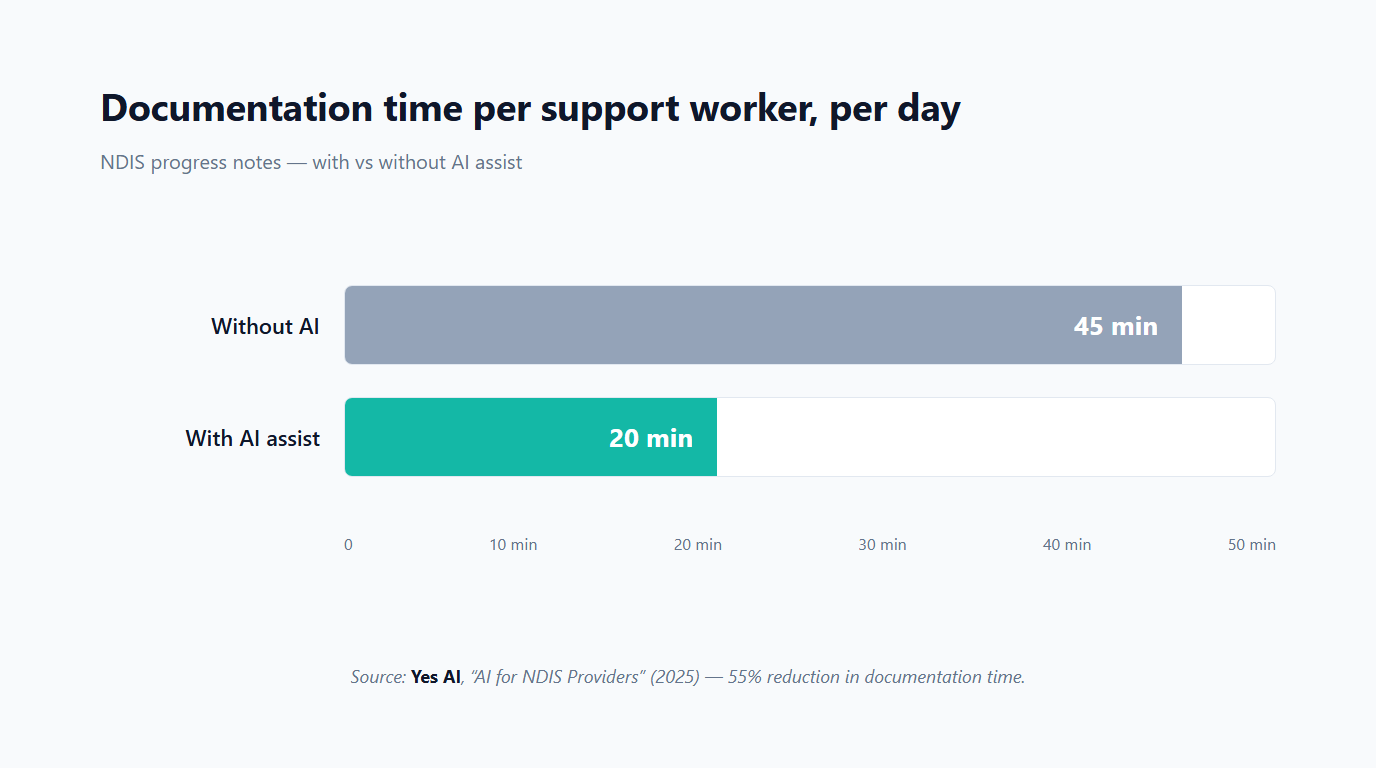
Twenty-five minutes per worker per day can sound small. But let’s scale it realistically.
For a provider with 10 support workers, that’s:
- ~25 minutes × 10 workers = ~4 hours per day recovered
- ~20 hours per week
- ~1,000 hours per year (conservative 50-week schedule)
At a loaded internal cost of around $45/hr for a support worker, this equals roughly $45,000 per year in reclaimed time. Even if you convert only half of those hours into billable support, you still recover ~$22,500 in annual revenue capacity per 10-worker team. Scale to 30 workers and you’re looking at six-figure impact — before considering audit prep or incident reports.
This isn’t the usual 1% efficiency gain. It’s a real line item moving on your P&L.
What “55% faster” actually looks like at the kitchen table
The number only matters if you can see the new workflow in a worker’s hands.
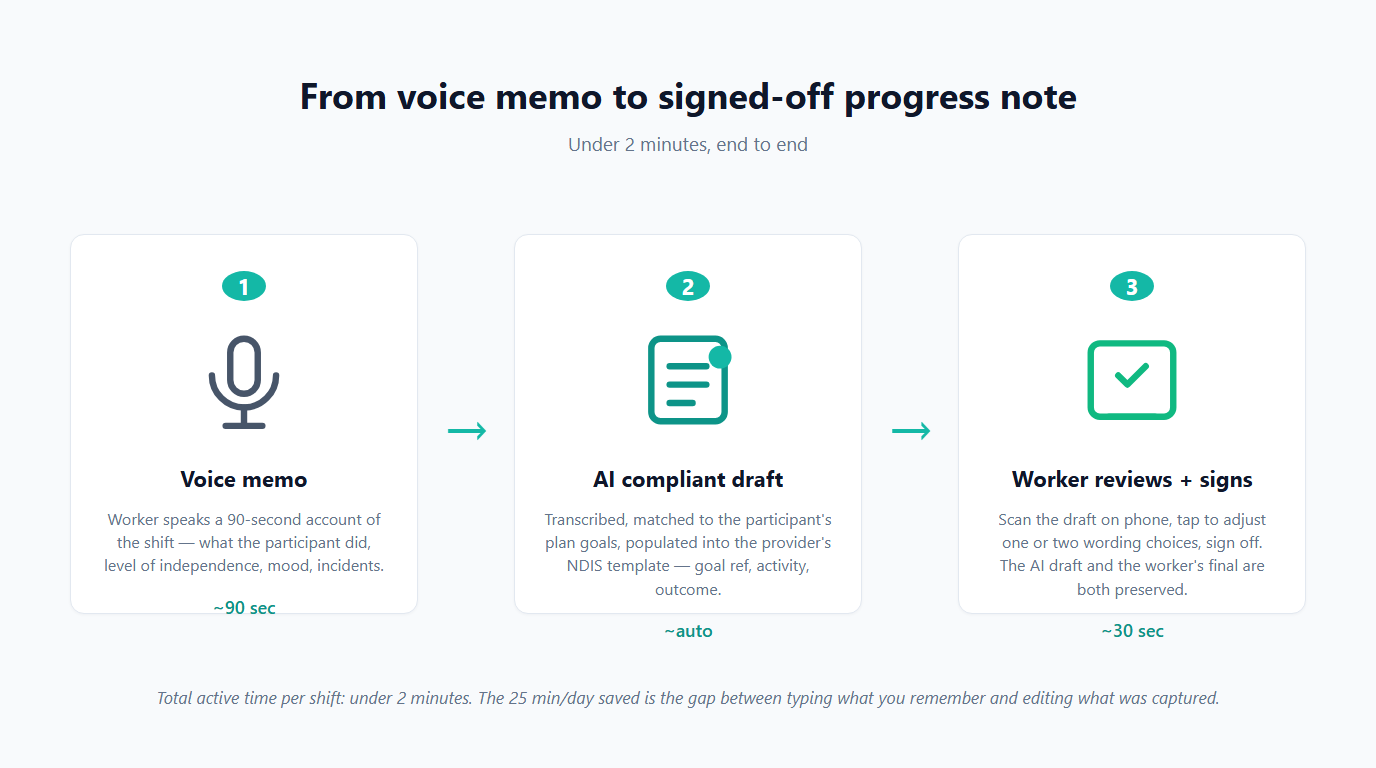
Step 1 — The voice memo. Worker finishes a shift. Instead of opening a laptop, they tap one button in the mobile app and speak for ~90 seconds: “With Mark today, we worked on his cooking goal. He prepped the vegetables independently this time, only needed prompting on the stove timing. We did the shopping list together and he chose the recipes. Mood was good. No incidents.”
Step 2 — The AI draft. The system transcribes the memo, identifies the participant from the schedule, pulls relevant plan goals, and generates a compliant progress note in your organisation’s NDIS template — complete with goal references, activity details, independence levels, outcomes, and timestamps.
Step 3 — The 30-second review. The worker opens the draft on their phone, makes quick tweaks (e.g. changing “minimal prompting” to “moderate prompting”), and signs off. Total active time: ~90 seconds recording + 30 seconds review.
That’s how the 20-minute daily average is achieved across four or five shifts.
Why progress notes are the wedge, not the prize
Progress notes are the most visible pain point, but the real value is that the same pattern unlocks the rest of NDIS documentation.
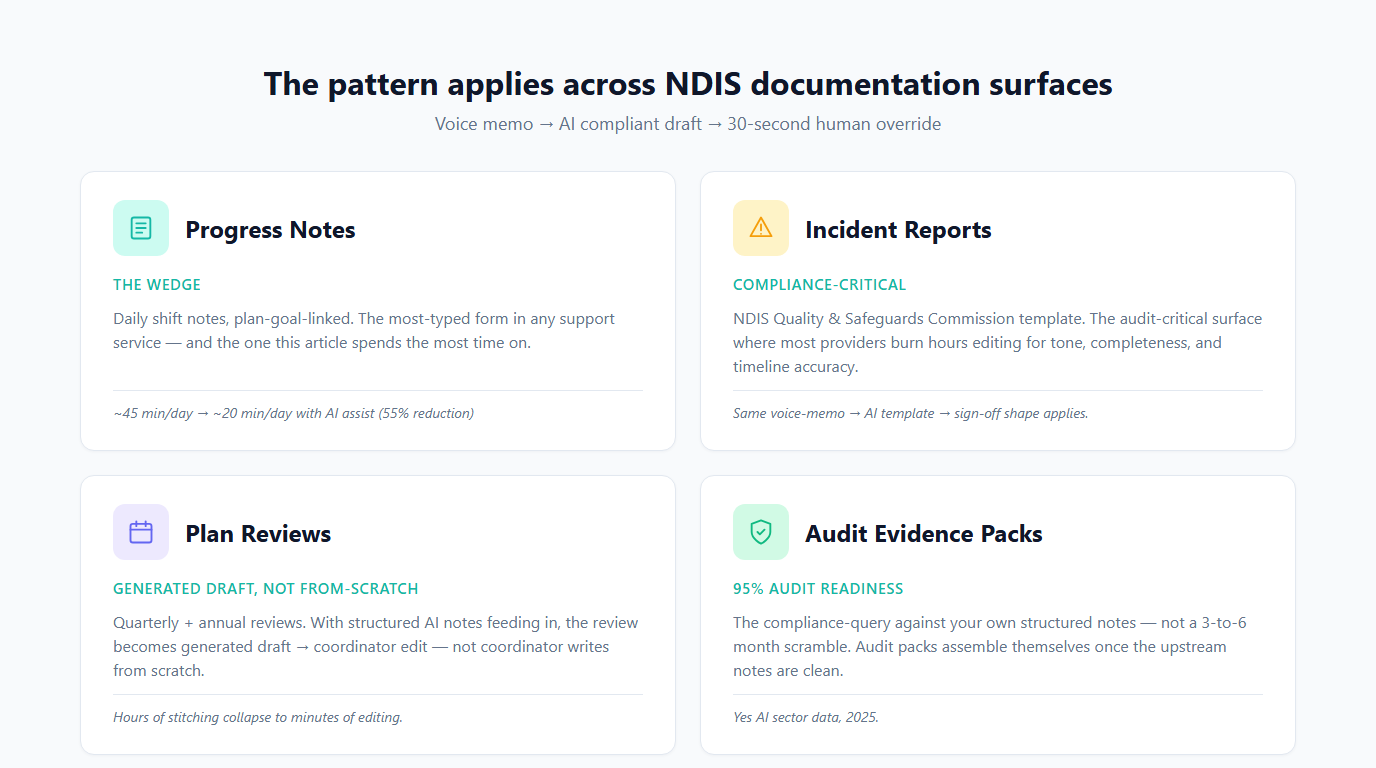
- Incident reports: Voice memo → AI draft in the NDIS Quality & Safeguards template → quick worker review.
- Plan reviews: Structured AI notes feed directly into quarterly and annual reviews, turning “write from scratch” into “edit the draft.”
- Audit packs: Providers using structured AI documentation report far higher audit readiness (Yes AI cites ~95%), replacing last-minute heroics with simple queries.
Yes AI reports an average ~60% reduction across all compliance and documentation work, with typical savings of ~$52,000/year for a mid-sized provider. These are vendor figures — always verify against your own numbers — but the direction is clear: documentation is where AI delivers the strongest ROI in NDIS, and progress notes are the first domino.
The 30-second override rule
Many providers get burned here. They adopt an AI tool only to discover the worker can’t easily correct the output, or the audit trail is unclear.
Demand this from any solution: The worker must be able to override any field in the AI-generated note in 30 seconds or less, and the audit trail must clearly show both the original AI draft and the final human-approved version.
If the override takes longer than 30 seconds, you’ve made the job harder. If the audit trail doesn’t separate AI from human input, you’ve created a compliance risk. NDIS auditors expect to see who decided what and when.
Where to start — and it’s not with a tool
The most common mistake is jumping straight to buying software. Instead, start with one form — usually the one your team complains about most.
Run a simple two-week documentation audit with three workers on that single form. Ask them to track:
- How long each note actually takes (start to submit).
- Which fields are mechanical/templatable (participant, date, goal reference, etc.).
- Which fields require real judgement and observation.
In two weeks you’ll know exactly what percentage of the form is automatable and what realistic time savings look like for your team.
Choosing your wedge wisely
If you’re a registered NDIS provider in Australia in 2026 and you haven’t yet audited at least one documentation process, that should be your next move — not buying tools or running pilots.
If you’d like a second pair of eyes on that audit, or prefer someone to bring the framework, benchmarks, and quick-win recommendations tailored to your workflow, I offer a fixed-scope Workflow Audit + Quick Win engagement for Australian NDIS providers.
Book a Workflow Audit → cal.com/trendai-au/workflow-audit
Source: Yes AI, “AI for NDIS Providers — Compliance Automation and Operational Efficiency” (yesai.au/ai-for-ndis-providers/, 2025). All time-saving and audit-readiness figures are vendor-published; verify against your own workforce and processes. The $45/hr loaded rate is a conservative mid-point and will vary by SCHADS classification and overheads.
Tai Vu is the founder of TrendAI and a plan manager at HappyHome (NDIS-registered). He builds bespoke workflow automation for Australian service businesses while staying grounded in daily NDIS operations.